How AI decides which pallets can ship
By Tommy Jonsson, CEO, Byte Motion · Updated 2026-11-19
A box over the edge can stop a shipment. Glare on the wrap can hide a dent. See why one pallet passes, one goes to an operator and one goes back for re-stacking.
Three pallets, three verdicts
These examples use two thresholds. With a clear image, a pallet passes at 90% or above and goes back for re-stacking at 15% or below. An operator reviews everything in between, plus any load with an unusable image. Each site sets its own thresholds.
Pass at 94%
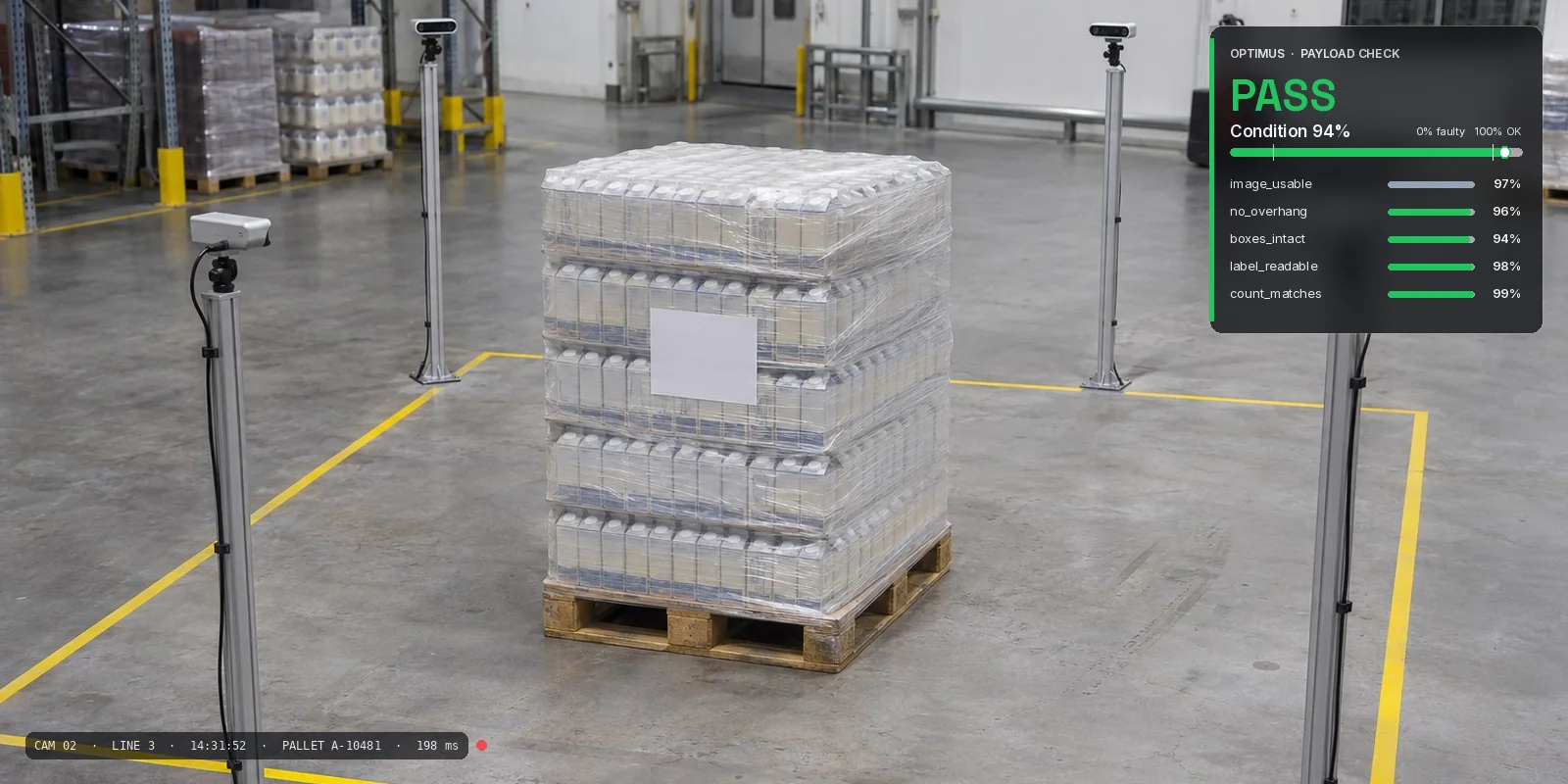
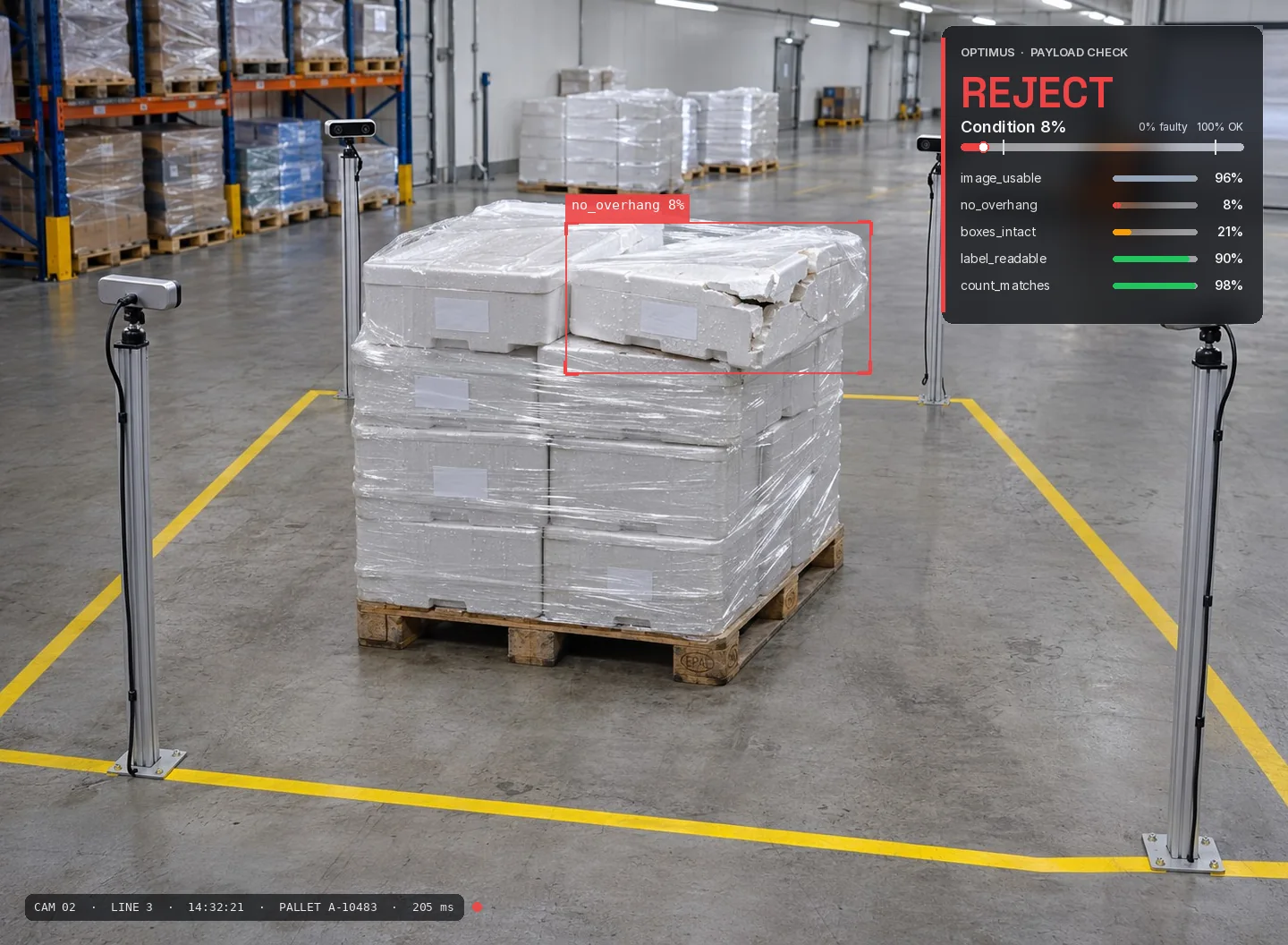
On this pallet, the milk cartons sit flush with the pallet edge. Even its lowest score, the check for damaged cartons, reaches 94%. The pallet clears the 90% pass threshold and moves on to labeling.
Manual check at 51%
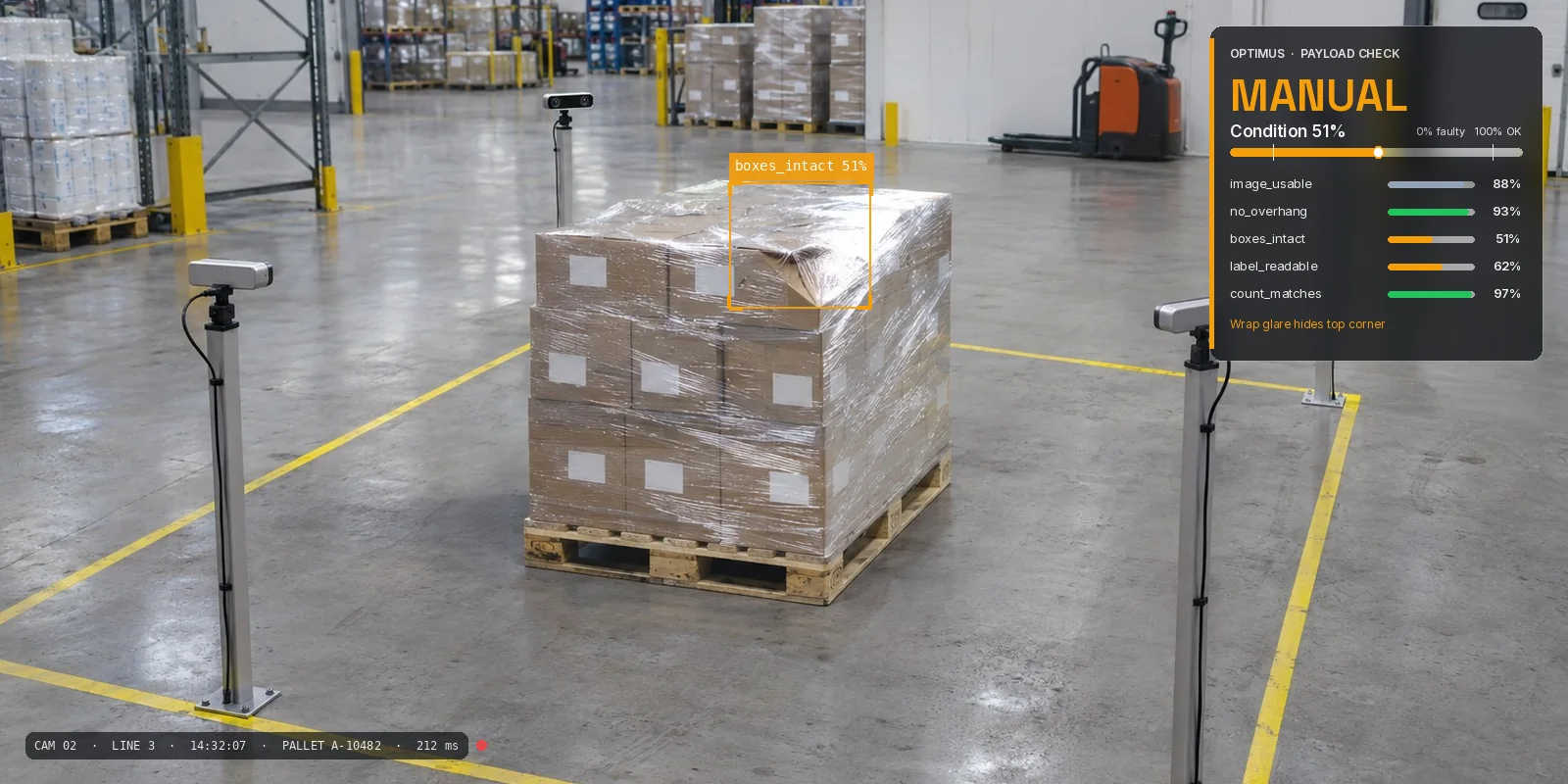
Glare on the wrap hides one corner of this load. The image is usable, but the carton might be dented. The damage check scores 51%, so an operator gets the photo and scores to decide whether the load can ship.
Reject at 8%
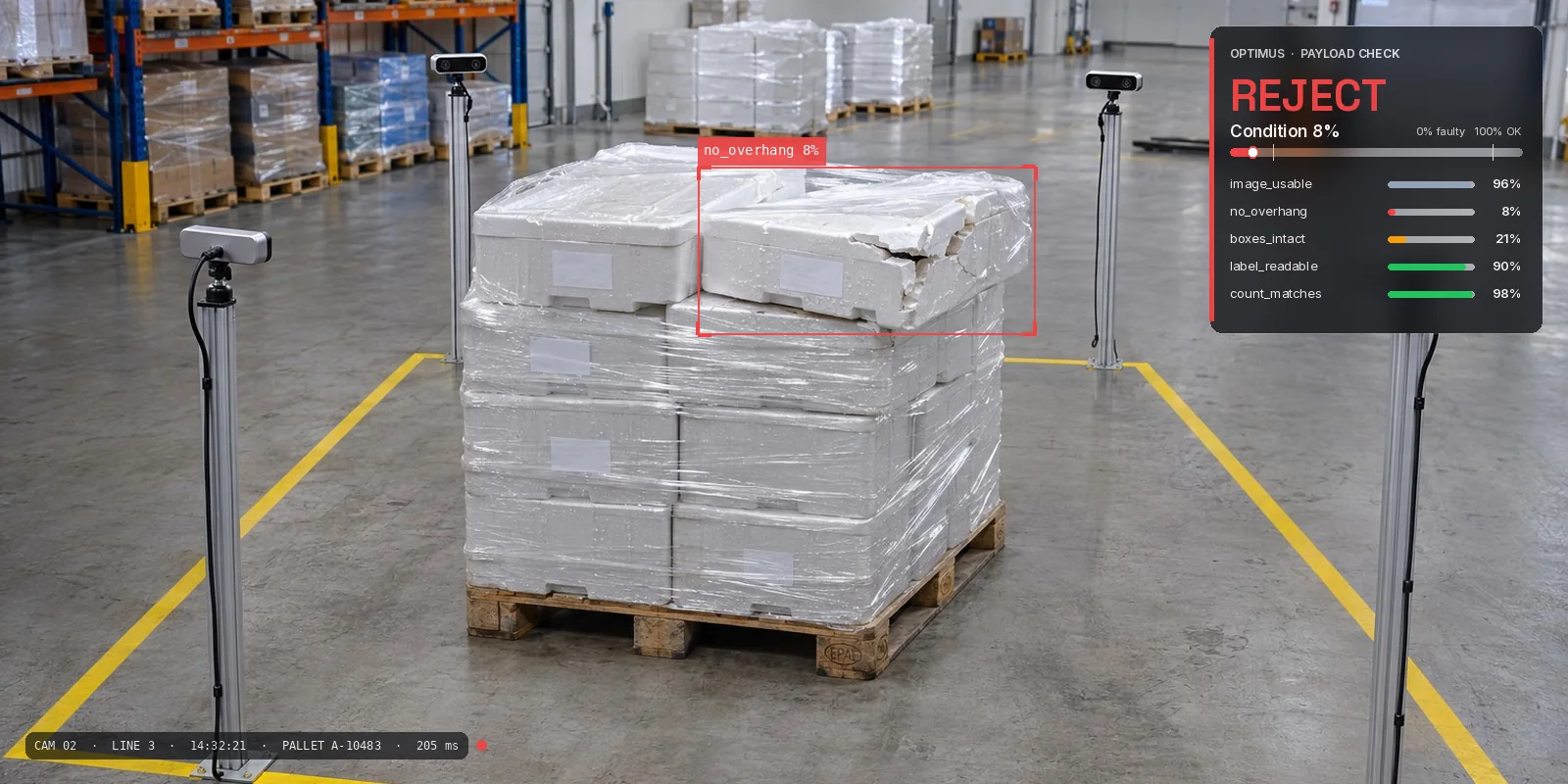
Two fish boxes on this pallet have shifted past the pallet edge. The overhang check scores 8%, below the 15% reject threshold. The line sends the pallet back for re-stacking.
When a pallet needs an operator
A crushed carton and a reflection on the wrap can look alike. Let both pallets ship and a damaged load may reach the customer. Stop both and someone has to unpack a sound load. A manual-check lane gives the operator a chance to resolve the doubtful case.
Step 1 — Capture the load
When a pallet reaches the inspection zone, the line signals the cameras. 3D cameras around the zone capture the wrapped load from several sides, and Optimus builds a 3D model of the pallet and its payload from those images.
The 3D model shows where each box sits relative to the pallet edge. See the camera and line layout in how a pallet inspection system works.
Step 2 — Score each check
Optimus checks the same load for several faults. Each check returns a score from 0% to 100%. A high score means the system is confident the load meets the packing standard on that point.
If the line stops a pallet, the operator can see which check triggered it. Each check can be tuned using examples from your own packing line.
| Check | Question the system answers |
|---|---|
| image_usable | Is the whole load visible and the capture clean? |
| no_overhang | Does the load stay inside the pallet boundary? |
| boxes_intact | Are all boxes and packages free of crushing, holes and splits? |
| label_readable | Is the label in place and readable? |
| count_matches | Does the number of boxes match the expected quantity? |
Step 3 — Find the lowest load score
The lowest load check becomes the condition score. If the overhang check scores 8%, the pallet scores 8% overall. Intact boxes and a readable label cannot compensate for a box hanging over the edge.
Image quality is a separate check. If a dirty lens, heavy glare or a pallet outside the camera frame makes the image unusable, an operator reviews the load whatever the other scores say.
Step 4 — Apply the routing thresholds
First check whether the image is usable. Only then apply the two condition thresholds. Here is how the example loads are routed.
Shipping a faulty load usually costs more than checking a borderline one. A higher pass threshold sends more pallets to an operator and reduces the risk of shipping a fault.
| Inspection result | Verdict | Next stop |
|---|---|---|
| Image usability below 70% | Manual check | Operator review at any condition score |
| Usable image, condition at least 90% | Pass | Labeling and dispatch |
| Usable image, condition above 15% and below 90% | Manual check | Operator review |
| Usable image, condition 15% or lower | Reject | Re-stacking or re-wrapping |
Step 5 — Route the pallet and save the evidence
Within seconds, Optimus sends the verdict to the line controller, warehouse system or ERP. It saves the photo and scores with the pallet ID. If a customer reports damage, the dispatch team can look up what the load looked like when it left.
Three kinds of questions: decide, grade and sort
Every check in this guide is a question about one capture, and every answer comes with a score. There are three kinds of question. A yes/no question asks whether something is true. A grading question picks one level on an ordered scale. A sorting question picks one category from a list. The scores in these examples are illustrative.
Decide: does the pallet match the order?
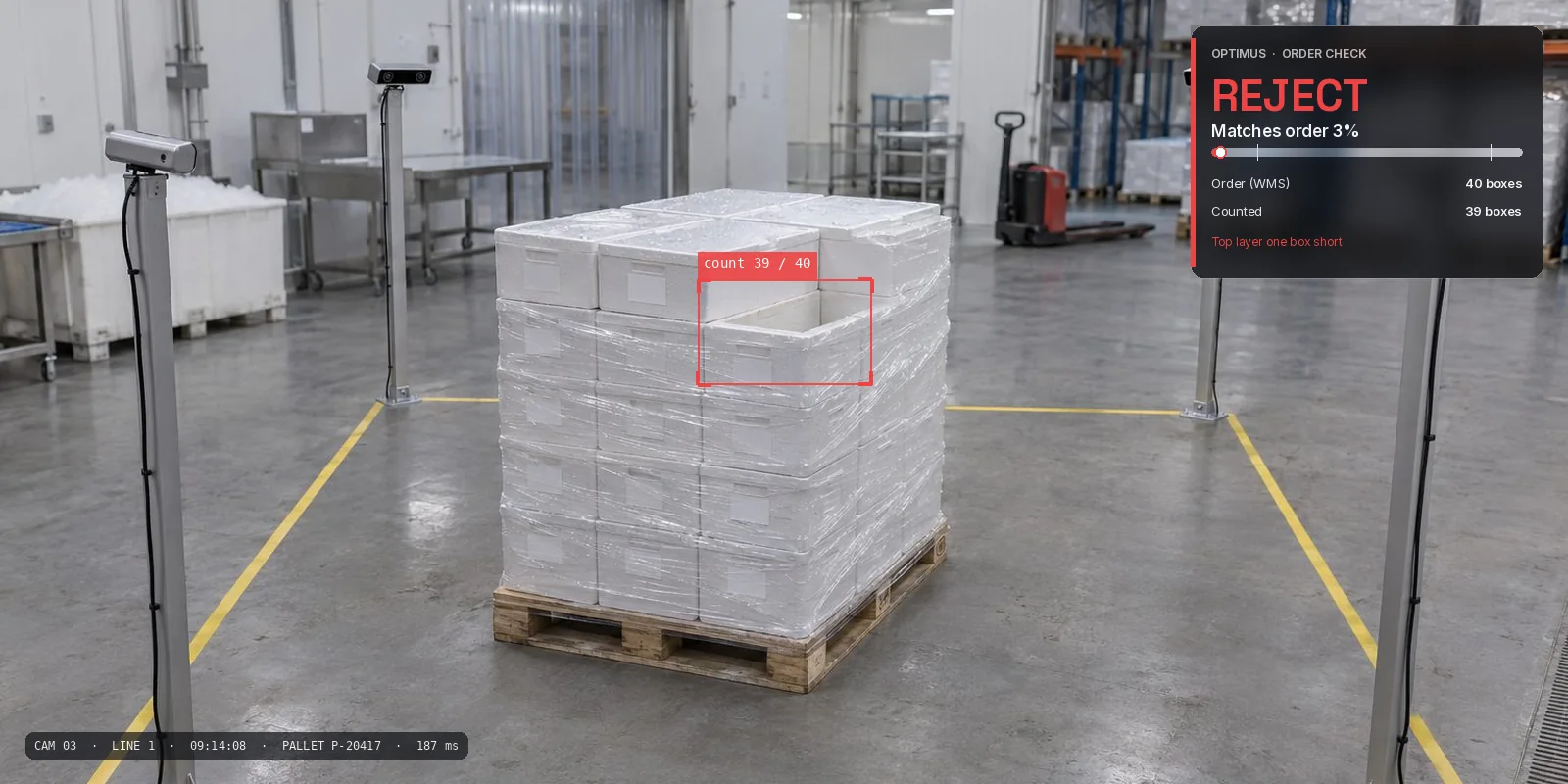
- The system gets: Camera images of a fish-box pallet, plus the order line from the warehouse system: 40 boxes.
- The question: Does the number of boxes on the pallet match the order? Yes or no.
- The answer: No. The system counts 39 boxes, because the top layer is one box short. The score for a match is 3%.
- What happens: Reject, since 3% is below the 15% threshold. The pallet stops before labeling, and the warehouse system gets the reason: 39 of 40 boxes.
A tidy, well-wrapped pallet can still be the wrong pallet. Checking the images against the order catches what the images alone cannot show.
Grade: how damaged is the load?
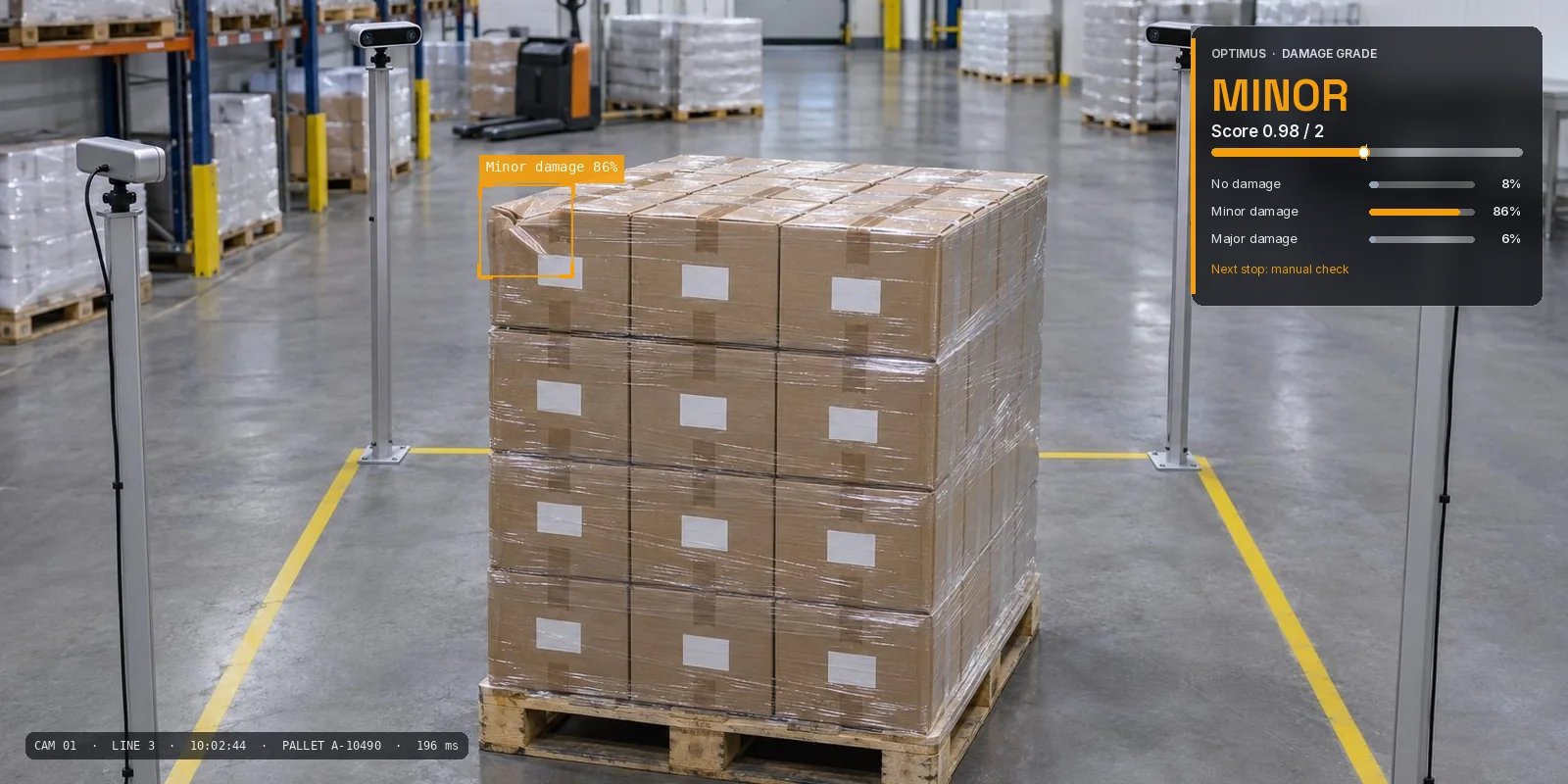
- The system gets: Camera images of the pallet, plus the site's damage scale with example images for each level: no damage, minor damage and major damage.
- The question: How damaged is the load? One of three ordered levels.
- The answer: Minor damage at 86%, no damage 8%, major damage 6%. On the scale from 0 to 2, that gives a score of 0.98.
- What happens: Manual check. Each level has its own route: an undamaged load ships, minor damage goes to an operator with the photo, and major damage goes back for re-packing.
Because the levels are ordered, the score can fall between two of them and shows how close the load is to the next level. A dented corner and a crushed layer are different faults, so they get different routes.
Sort: which container does this bag go to?
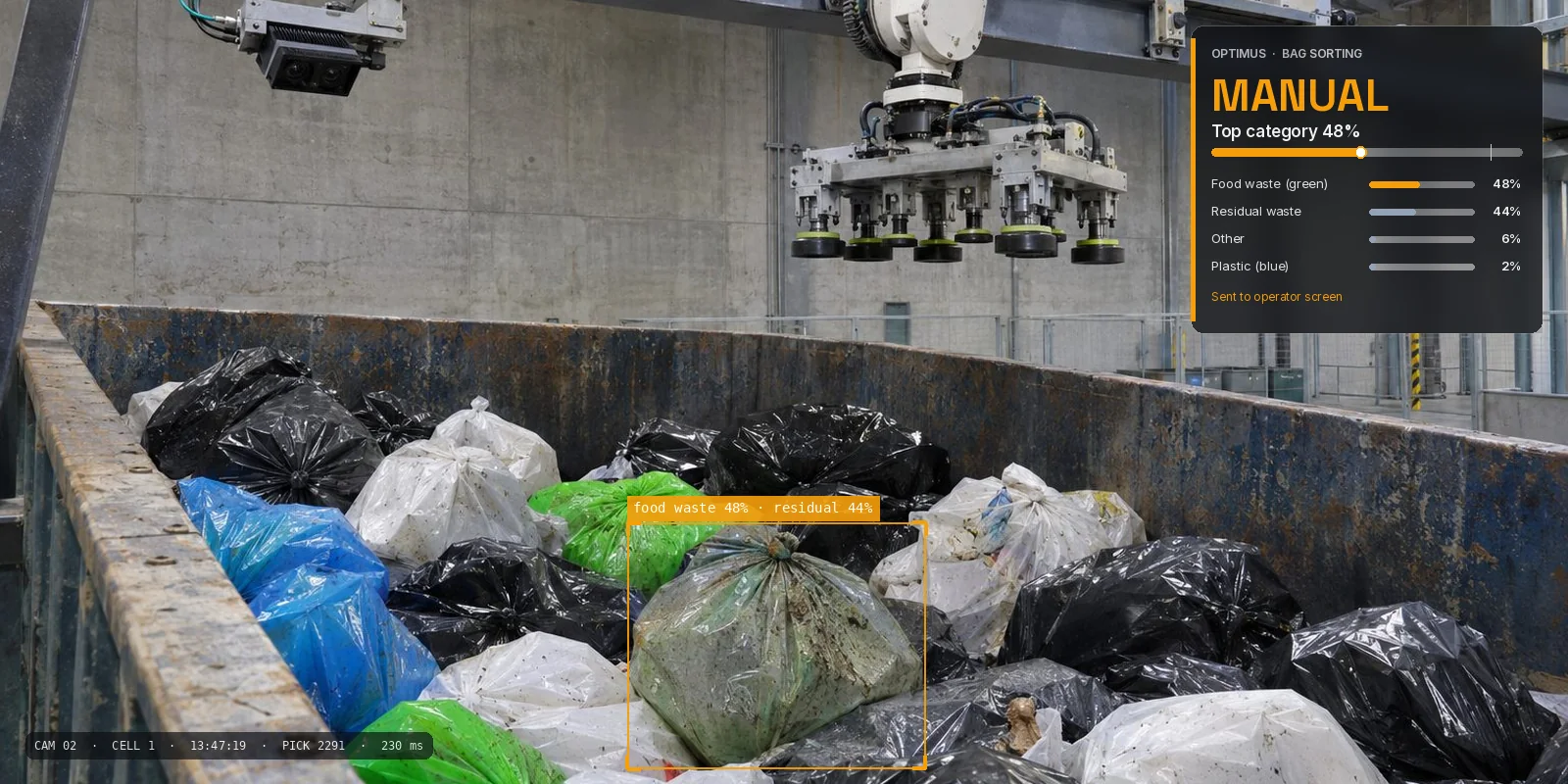
- The system gets: A 3D colour image of the bags in the container, plus the categories the site sorts: food waste in green bags, plastic packaging in blue bags, residual waste, and other.
- The question: Which category does this bag belong to? One of four.
- The answer: Food waste 48%, residual waste 44%, other 6%, plastic packaging 2%. No category reaches 90%.
- What happens: Manual check. An operator sees the image on a screen through Human Assisted Vision and picks food waste. The robot moves the bag to the food-waste container, and the decision is saved as a training example.
The system does not guess between two close categories. An operator settles the doubtful bag from a screen, and the saved example can help train the system on similar bags.
Can one capture answer several questions?
Yes. The five pallet checks in Step 2 are five questions answered from the same images, and a site can add its own, such as the match against the order. When one answer decides what to ask next, the questions run in order: the image check comes first, and only a usable image moves on to the load checks.
How are the thresholds set?
During the pre-study, Byte Motion tests different thresholds on pallets your team has labeled. The team checks how many faulty loads would pass, how often a reject is justified and how many pallets your operators would need to review each shift. Each question can have its own thresholds, depending on what a wrong answer costs.
The thresholds are adjusted as production data accumulates. If the manual-check share is higher than the outbound flow can absorb, more training data on the borderline cases usually helps more than moving the thresholds.
What happens to pallets sent to manual check?
An operator sees the photo, the scores and the check that stopped the pallet. They decide at the inspection lane or from a screen using Human Assisted Vision. The line acts on their decision, and the saved example can help train the system on similar loads.
The route itself is part of the line logic: approved pallets continue to labeling, rejected pallets go back for re-stacking, and manual-check pallets are moved to a review lane by conveyor, forklift or AGV. Nobody has to decide where a pallet goes; the operator only decides whether the doubtful one can ship.
Is a confidence score the same as accuracy?
A confidence score describes one check on one load. Accuracy measures how often decisions agree with known outcomes across many loads. Before production, Byte Motion tests the scores on labeled pallets the system has never seen.
For dispatch, two figures matter most. The false-pass rate tells you how often faulty pallets get through. The manual-check rate tells you how much work reaches your operators.
Does the same decision logic work outside pallet inspection?
Yes. The checks change with the task, but the scores, the thresholds and the route to an operator stay the same, as the waste-bag example above shows. On a production line the checks cover product defects, as in how AI quality control works, and in robot cells they decide whether a pick is safe to attempt, as in AI vision-guided pick and place. The automated pallet inspection page covers the full set of payload checks.
Test the thresholds on your own pallets
For a first assessment, send photos or video of your outbound pallets and the inspection point. A pre-study takes one to three weeks and costs approximately €10,000. You see how the false-pass and manual-check rates change with the thresholds before committing to an installation. Contact Byte Motion to discuss your line. We reply within one business day.